> For the complete documentation index, see [llms.txt](https://voyzu.gitbook.io/docs/llms.txt). Markdown versions of documentation pages are available by appending `.md` to page URLs; this page is available as [Markdown](https://voyzu.gitbook.io/docs/voyzu-core-concepts/financial-document-processing.md).
# Financial Document Processing
## Overview
All financial transactions in Voyzu, without exception, come via financial documents posted to the system. Voyzu provides a range of financial documents to fit various use cases. For example:
* To record the issuing of an invoice you would post an AR\_INVOICE document
* When a customer makes a payment against that invoice you would post an AR\_RECEIPT document
* To record a bill received from a supplier post an AP\_BILL document
You can view a list of all Financial Documents at [Financial Documents](/docs/help-core/financial-documents.md)
Financial Documents are processed by an associated Financial Document Processor, sometimes called a Financial Document processing engine. This engine validates the document provided, makes the necessary calculations and posts to the Company Ledger.
Although all financial documents are different in their exact shape, there are common principals that apply to submitting financial documents to Voyzu.
## Journal Treatment
All financial document postings result in exactly one Company Ledger entry - that is one Ledger Entry with multiple ledger lines. Ledger lines CREDITS total will always equal ledger lines DEBITS total. The Ledger treatment varies according to the document type, and is always documented in the document posting engine documentation.
For example the Ledger treatment for `AR_INVOICE` is:
```
AR_INVOICE
Ledger (typical use case):
Dr Accounts Receivable 1,150.00
Cr Revenue 1,000.00
Cr Tax Output 150.00
BY WAY OF:
Voyzu journal:
Dr AR_TRADE_RECEIVABLES Control Account
Cr Default AR_INVOICE.revenue_posting_code,
or supplied valid revenue posting code
Cr Tax Output posting code(s), calculated based on the line level Tax Posting code
```
### Control Accounts
Every Voyzu organization supports Accounts Receivable (AR) and Accounts Payable (AP) Control Accounts. These can be viewed, and assigned to General Ledger Accounts in the Voyzu Admin Console.
Financial Document processors use these Control Accounts as per the appropriate accounting practice for that document type. For example, for an AR Invoice, a single Control Account holds the total of all Customer Invoices balances, therefore this Control Account is debited the tax inclusive invoice total as per standard accounting practice.
### Posting Codes
To ensure accurate reporting, revenue and expenses should be assigned to the correct General Ledger (GL) Account codes. However GL codes are designed to be flexible and can be changed to suit organization requirements. Also as a control mechanism there should be a way to define a set of allowed GL Account codes for a given Financial Document.
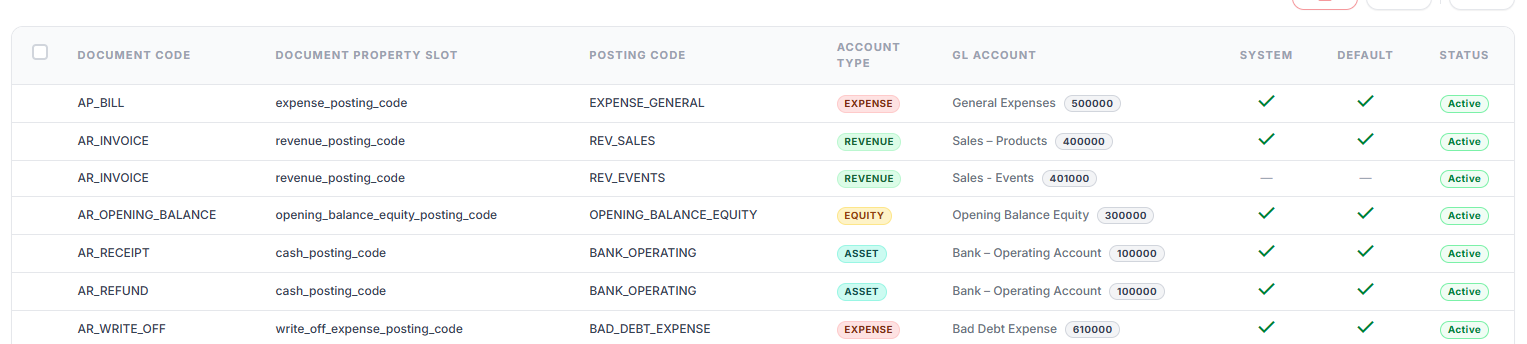
For these reasons there needs to be a way to link Financial Documents to allowed GL Accounts. Voyzu's solution is the concept of Posting Codes. Posting Codes are stable aliases to a subset of GL accounts applicable to the Financial Document.
Returning to our AR Invoice example, revenue is posted to the default `ar_invoice_code` lodged against the AR\_INVOICE document.
For every document type there is always a default Posting Code which will be used if no Posting Code is supplied in the document- meaning that the document Posting Code does not have to be supplied. This is why the term document property "slot" is used - the document property doesn't have to be supplied, but if it is is must be supplied with the exact property "slot" name.
**Example:**
```json
{
// The specific GL Code posted is derived from the posting codes configuration
"revenue_posting_code": "400000"
}
```
#### Journal Entries Created
As described above, a Journal Entry will be created for every document posted. The document supplied, and a document enhanced with document engine calculations are stored against the Journal Entry for audit purposes.
## Tax Treatment
Tax Treatment, like Journal treatment is determined by the posting engine. For example tax may be added to Customer Invoices but no tax is applicable to invoice payments. The Tax Treatment for every document type is described in the document posting engine documentation. To calculate taxation accurately, the posting engine needs to know some basic Tax facts about the transaction. For example:
* Ithis a taxable transaction or is it exempt?
* For countries that support regional tax such as Canada or the USA, what regional tax authorities and rates apply
Taxation can be a complex area. The Voyzu design makes tax as simple as possible while also providing flexibility where needed.
### Tax Accounts
Voyzu defines two Tax Accounts, Tax on Sales and Tax on Purchases. These are analogous to AR and AP Control accounts - i.e. they are system codes, linked to General Ledger Accounts, that hold a balance and are backed by a dedicated ledger (the Tax Ledger in this case). These codes are used as applicable by posting engines.
Taking our AR Invoice example, an invoice issued generally means tax to pay - a liability. Therefore the Tax on Sales Tax Account is used by the posting engine
### Tax Rules
Whereas the document posting engine can use standard accounting practices to determine the tax direction (tax payable or receivable), it cannot by itself know how much tax is payable and to which tax authority. Tax rules allow callers to specify tax information, without having to undertake complex tax calculations.
For document types where tax is relevant, a tax rule can be supplied on a header level - in which case it will be applied to all lines, and / or on a line level.
#### Available Tax Rules
Tax Rules are defined on a country basis, according to that country's tax regulations. Tax rules define:
* Whether tax is payable
* The Tax Authority / Authorities tax is payable to
* The applicable tax rate
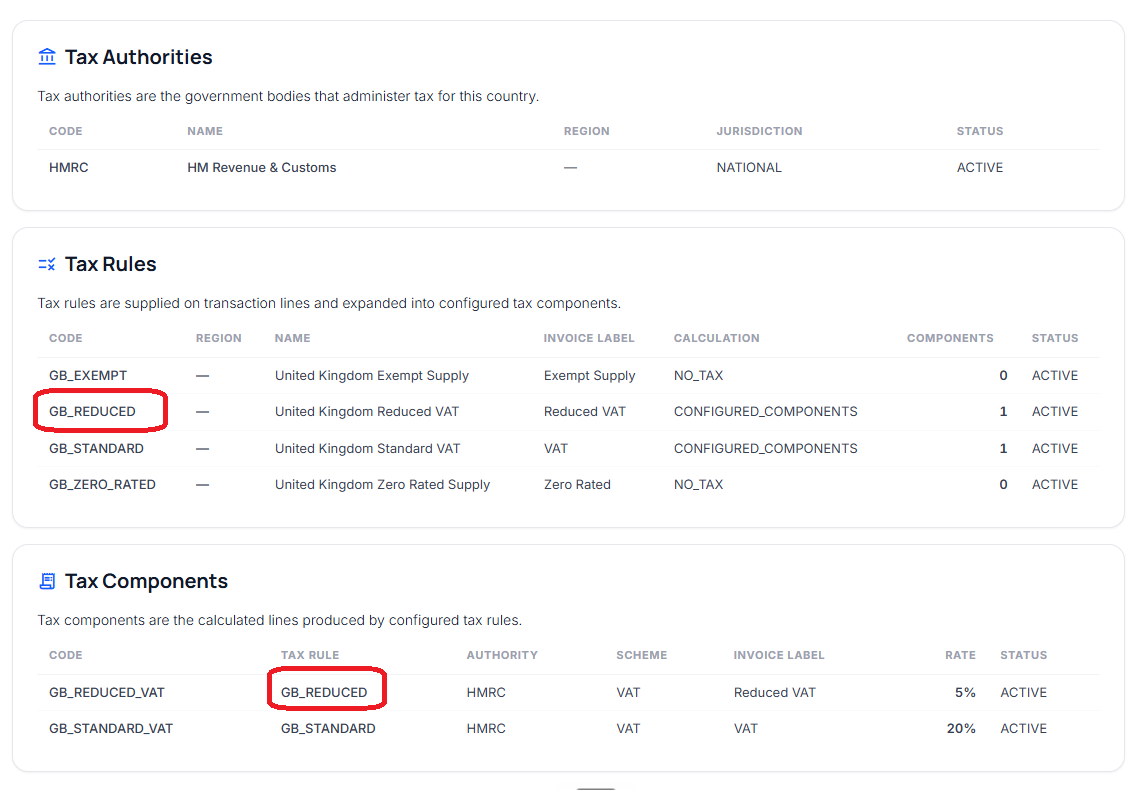
As an example, consider issuing an invoice in Great Britain, to which reduced tax applies
In this case you would specify the `GB_REDUCED` Tax Rule. This rule looks up the Tax Components table, and applies a tax rate of 5%
Example:
```json
{
"tax_rule": "GB_REDUCED"
}
```
#### Zero Tax Tax Rules
Tax rules with a calculation of `NO_TAX` will not trigger any tax. The tax code used will be recorded for audit purposes.
#### Caller Supplied Tax
For countries such as the U.S.A where sales tax is extremely complex and to support edge cases in other countries, all tax-relevant financial documents support a `CALLER_SUPPLIED` Tax Rule. In this case you must specify the tax details - i.e.
* The Tax Authority. This must match a Tax Authority in Voyzu
* The Tax Rate
* Optionally the Invoice Label
**Example:**
```json
{
"tax_rule": "CALLER_SUPPLIED",
"tax_components": [
{
"tax_authority_code": "US_CA_CDTFA",
"tax_rate": 0.0725,
"invoice_label": "CA State Sales Tax"
},
{
"tax_authority_code": "US_CA_LOS_ANGELES_DISTRICT",
"tax_rate": 0.0225,
"invoice_label": "Los Angeles District Tax"
}
]
}
```
## Supporting Ledgers / Subledgers
Supporting Ledgers such as the Tax Ledger and Subledgers such as the Accounts Receivable Subledger record supporting data that backs up a Control Account total. For example a Balance Sheet may tell you that Accounts Receivable totals a certain amount, but in itself it cannot tell you how that total was arrived at. A drill down into Ledger Entries can supply some detail, but it won't give you a clear picture of the financial transactions - the invoices, payments etc - that sit behind this total. The subledger provides a clear picture of the transactions that sit behind a Control Account balance.
The document posting engine will determine which Supporting Ledger(s) apply to the transaction and creates supporting ledger entries. See the relevant document processing engine documentation for detail on Subledger treatment
### Counterparties
Counterparties are related parties to a given transaction. For example a customer is a counterparty to an invoice or invoice payment transaction. The applicable Tax Authority may also be said to be a counterparty to the transaction.
For documents that support counterparties then the document can either supply the code of an existing counterparty, or supply a new counterparty, in which case the counterparty will be added. Counterparties cannot be updated via document posting, use the relevant counterparty API instead.
Counterparty balances are updated as needed by the Financial Document engine.
### Supplying bank transaction details
Some financial document types target a Bank / Cash Control account. For example the `AR_RECEIPT` ledger equation is:
```txt
Dr BANK_OPERATING 1,150.00
Cr AR_TRADE_RECEIVABLES 1,150.00
```
For these documents you can optionally supply bank and payment transaction details. These details are printed on the Bank / Cash activity report and can be useful for payments reconciliation. Supply details as follows:
```json
{
"bank_cash_details": {
"code": "BANK_OPERATING",
"tx_id": "TX-123456789",
"tx_code": "CR",
"tx_ref": "BANK-REF-001",
"tx_details": "Dummy bank transaction details",
"payment_ref": "PAY-0001"
}
}
```
If a document (for example a Customer Invoice) does not target a Bank / Cash account then bank details cannot be supplied.
## Dimensions
Dimensions add analytics to financial postings while keeping the statutory ledger structure stable.
Dimensions apply to certain management accounts, generally profit and loss impacting transactions. Some document processors support dimensions and others do not. Where a follow-on document reverses or derives from a source document, the processor documentation should define whether source dimensions are carried forward.
For example, `AR_INVOICE` supports dimensions. `AR_RECEIPT` does not support dimensions. See the Financial Document documentation for specific document level details.
### Supplying dimensions with a financial document
When supported by the financial document processor, the dcoument can supply dimensions at header level:
```jsonc
// dimentions supplied at the document header level will apply to all lines
// unless over-ridden at a line level
"dimensions": {
"SALES_CHANNEL": "Direct",
"DEPARTMENT": "Marketing"
}
```
If the document has lines, a line can also supply dimensions. Header dimensions apply to all lines unless a line overrides the same dimension.
### Configuring dimensions
Dimensions can be configured within the "Organization > Dimensions" screen and associated API. A financial document processor declares whether it supports dimensions.
### Validating supplied dimensions
If a document processor does not support dimensions and dimensions are supplied, the transaction is rejected.
If dimensions are supplied to a processor that supports dimensions:
* The dimension code must exist and be active.
* The supplied value must exist and be active for that dimension.
* Values are optional. There is no document-type-level required dimension configuration.
## Document Identifier
Every Financial Document submitted to Voyzu has a unique (per Company) identifier. In documents you supply this is always known as `document_id`. You can optionally supply this value, if not supplied the system will generate one for you. The Document Id is always send in the return envelope.
Requirements for this field are:
* It must be unique per company.
* length up to 20 characters
* Field constraints:
* uppercase or lowercase letters
* digits
* underscore
* dash
The presence of this field and the fact you can supply it yourself means that if desireed you can maintain your own document naming scheme independent of Voyzu's internal naming.
There is no hard requirement on the semantic meaning of this field, but for some documents there are established norms. For example you would expect that the document id on an `AR_INVOICE` document to represent the Invoice Number. For other documents (for example a refund), the Document Id may not have an established norm. Regardless, the documkent id is simply a unique document identifier which you can optionally supply
### Document Id usage
The document Id is an important identifier. Use this reference when you post a Financial Document that references another Financial Document, this field is used to reference the target document. For example consider an invoice payment - the `AR_RECEIPT` document. When allocations are made to invoices the invoice numbers (stored as Document Id) are referenced:
```json
// Optional. Invoice allocations
"allocations": [
{
// the invoice number to allocate to
"document_id": "INV_10000",
// payment amount towards the invoice
"amount": "1150.00"
}
]
```
## Document References
### Header level document references
#### Caller supplied document references
The following references may be supplied with all financial documents:
**`document_id`**
All Voyzu financial documents accept an optional `document_id` property. This value can be provided by you, the integrator as your unique document identifier. For example, for an invoice the document Id may be an invoice number, e.g.`INV-10000` If this value is not provided a value will be generated, and returned back to the caller in the return envelope. This value is used by Voyzu as the primary document identifier, and has the following constraints:
* The value must be unique per company. Attempting to post a duplicate document id will result in the transaction being rejected
* Alphanumeric characters including underscore (\_) and dash (-) only
* 20 character maximum
The document id is printed in all ledger reporting, and appears in subledger reporting.
**`memo`**
A header level memo can optionally be supplied, this is a place for you to provide some very brief information about the transaction. The following constraints apply to the document memo
* 50 characters max
The document memo is printed on ledger detail reporting. It is included in the document snapshot.
#### Ledger References
The document `memo` will be carried through to the ledger entry header `memo` property
**`description`**
Voyzu will generate a human readable document description for the journal header. This is based on document data - for example "Partial payment of AR invoice INV-10001"
## Line level document references
#### Caller supplied document references
**`memo`**
A line level memo can optionally be supplied, this is a place for you to provide some very brief information about the transaction line. The following constraints apply to the line memo
* 50 characters max
#### Ledger References
**`line description`**
For documents that have document lines (e.g. invoices), and where document lines support a "description" property, this description will be used as the line description
For other documents a relevant system-generated description will be used on ledger lines
## Return Envelope
The response to a request to a document processing endpoint is an object containing sub-objects:
* `detailed_document` The supplied document enriched with calculations
* `posting_details` Details of the Company Ledger journal (header + lines).
* Supporting Ledger details - If applicable. Subledger details resulting from the transaction.
## 'preview' parameter
A `preview` parameter can be supplied to every endpoint. If this parameter is supplied the return objectwill be retuned, but no data will be changed